Table of Contents
- Connecting Customer Conversations with CRM
- Three Ways Neocrm Works with Zoom Contact Center
- Creating a Connected Service Experience
- Built to Connect with the Global Business Ecosystem
Overview
Customer service conversations often happen across multiple channels, while customer profiles, service history, work orders, and follow-up actions live in CRM. When these interactions and customer data remain disconnected, service teams have to switch between systems and manually reconstruct context.
By integrating Zoom Contact Center with Neocrm Service Cloud, Neocrm brings voice conversations directly into a unified customer service workspace. Service representatives can make and receive calls through Zoom while accessing customer information, service records, knowledge resources, and follow-up actions within the same environment.
Zoom is also part of Neocrm’s broader omnichannel service experience. Alongside voice, service teams can manage customer interactions across online chat, WhatsApp, and email from the same service console, while AI Agent Assist provides real-time knowledge recommendations, captures key information, supports case or work order creation, and helps generate post-interaction summaries and quality reviews.
Together, Neocrm connects customer conversations, CRM context, AI assistance, and service actions in one connected service experience.
1. Connecting Customer Conversations with CRM
A customer call is rarely an isolated interaction. Behind every conversation, service representatives may need to understand who the customer is, review previous service history, check open work orders, search for relevant knowledge, or decide what action should happen next.
When the communication channel and CRM operate separately, representatives have to move between applications while the conversation is already in progress. Customer context can become fragmented, important information may need to be entered manually, and follow-up actions can easily become disconnected from the original interaction.
By connecting Zoom Contact Center with Neocrm Service Cloud, voice communication becomes part of the CRM service process. Representatives can handle customer calls while working with the relevant customer and service context in Neocrm, including customer records, service history, work orders, knowledge resources, and service cases.
This means the conversation does not stop at the call itself. It can immediately become part of the customer’s ongoing service journey, with the context and next actions captured in CRM.
In Neocrm, the service experience can therefore flow naturally from:
Customer Conversation → Unified Customer Context → Intelligent Service Action
Rather than treating communication as a separate system, Neocrm connects it with the customer data and business processes that service teams rely on every day.
2. Three Ways Neocrm Works with Zoom Contact Center
Connecting a contact center with CRM becomes most valuable when communication, customer context, and follow-up actions work together as part of the same service process.
With Zoom Contact Center integrated into Neocrm Service Cloud, representatives can engage customers, access relevant CRM information during conversations, and continue service activities without breaking the flow of work.
2.1 Engage Customers Directly from Neocrm
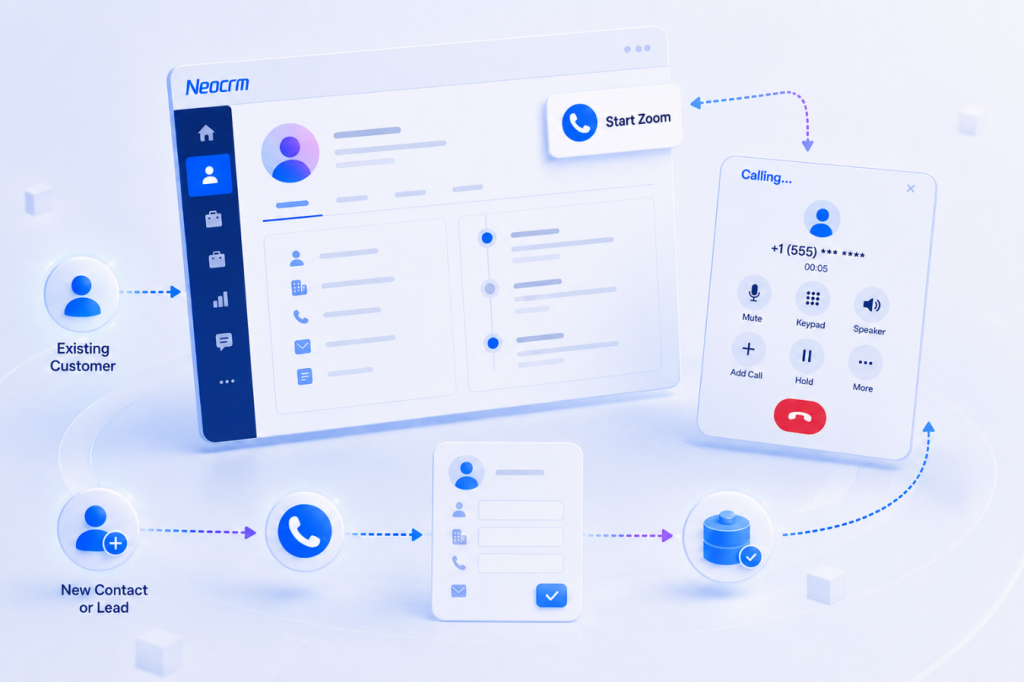
When a service representative needs to contact a customer, the call can be initiated through Zoom directly from the Neocrm service workspace.
The representative can stay within the CRM environment while accessing the customer information and service context relevant to the conversation, reducing the need to switch between separate communication and CRM applications.
Not every conversation starts with an existing customer record. If the person is new to the system, the representative can create a new contact or sales lead in Neocrm and capture the relevant information from the interaction.
This allows a new customer conversation to become part of CRM from the very first touchpoint.
2.2 Bring Customer Context into Incoming Calls
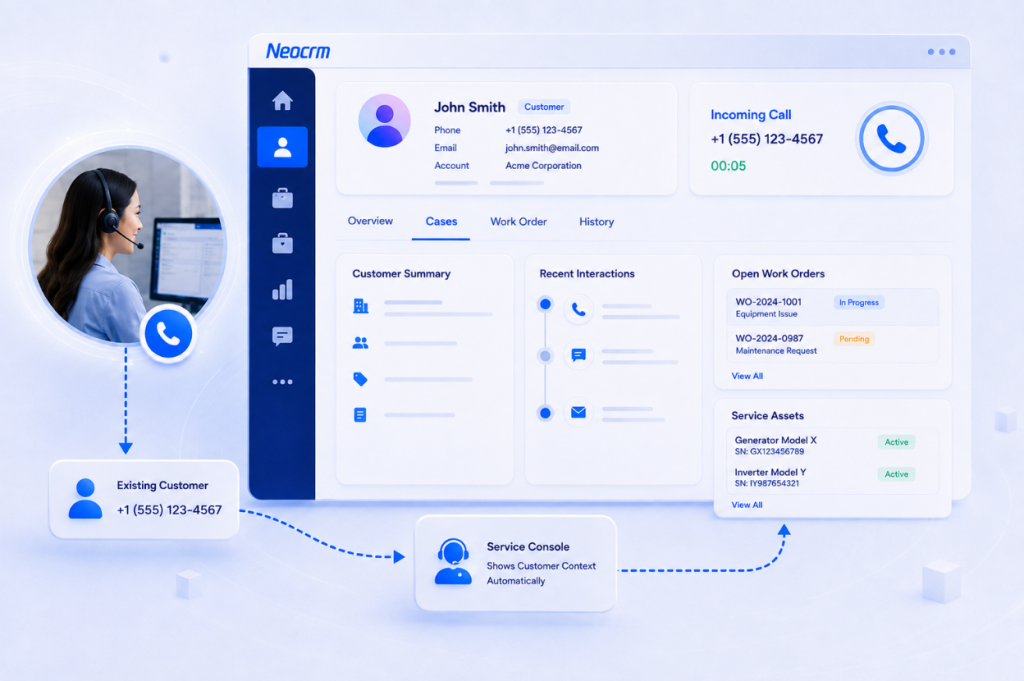
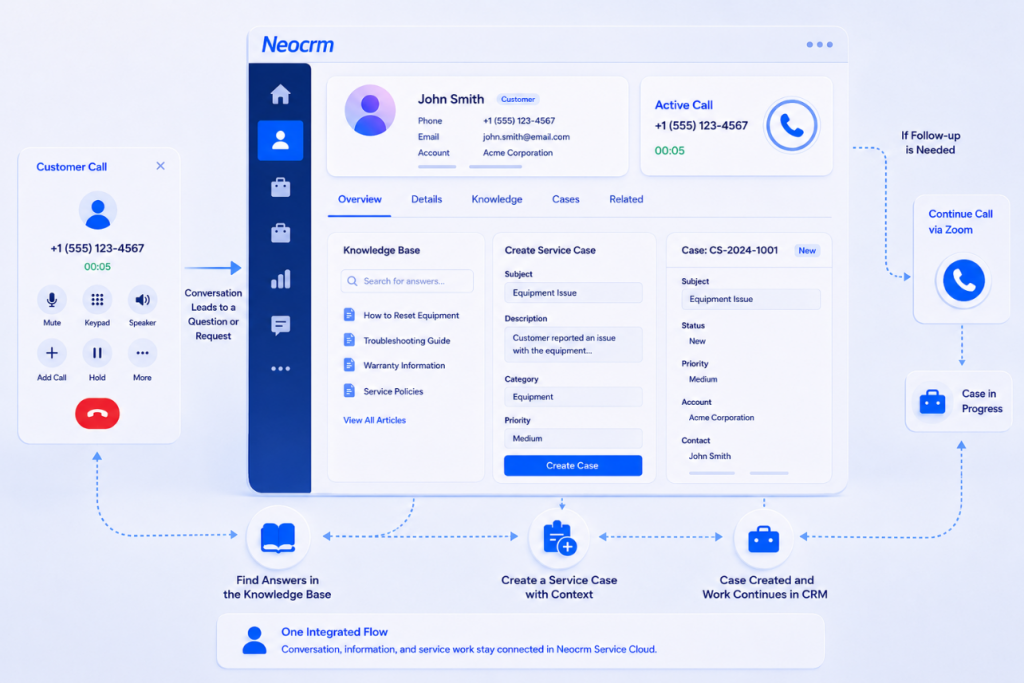
When an existing customer calls, Neocrm can match the incoming call with the corresponding customer record and bring relevant information into the service console.
As the conversation begins, the representative can access customer details and related service information, such as previous service records and work orders, helping them understand the customer’s situation without having to search across multiple systems.
This gives representatives more context at the moment it matters and helps turn an incoming call from an isolated interaction into part of the customer’s broader service history.
2.3 Turn Conversations into Service Actions
During the call, Neocrm provides real-time speech transcription, while the AI Agent continuously captures the conversation and identifies the customer’s questions and needs. Based on the context, it can provide service representatives with relevant solutions, recommended responses, and suggested talking points in real time, helping them respond more efficiently and consistently.
Neocrm can also automatically extract key information from the conversation, such as customer requests, issues, and follow-up requirements, and create a service case for continued handling. Real-time sentiment monitoring helps representatives understand changes in the customer’s emotional state during the call, enabling them to adjust their communication and respond more appropriately.
After the call, AI-generated summaries help representatives quickly review the conversation, key decisions, and next steps. Voice quality inspection can further evaluate the interaction against service standards, helping managers identify improvement opportunities and support more consistent service delivery.
If further communication is needed, the representative can reconnect with the customer while continuing to work from the same CRM environment.
In this way, the integration goes beyond connecting a phone channel with CRM. It helps service teams move more naturally from conversation to insight to action, keeping real-time assistance, customer context, follow-up execution, and service quality management connected.
3. Creating a Connected Service Experience
Customer service today rarely happens through a single channel. A conversation may begin with a phone call, continue through online chat or WhatsApp, and later move to email for follow-up.
Neocrm brings these interactions together in a unified service workspace, allowing service representatives to engage customers across voice, online chat, WhatsApp, and email while staying connected to the same customer and service context.
Instead of managing each channel as a separate interaction, representatives can work with customer profiles, service history, cases, work orders, and other relevant information from one service console. This helps preserve context as conversations move across channels and gives representatives a more complete understanding of each customer relationship.
More importantly, customer interactions are connected directly with service execution in CRM. Whether a request comes through a Zoom call, chat message, WhatsApp conversation, or email, representatives can continue the process through cases, work orders, knowledge resources, and follow-up activities without disconnecting the conversation from the underlying service workflow.
With AI embedded throughout the service process, Neocrm can further help teams understand interactions, capture important information, and support the next action—regardless of the channel the customer chooses.
The result is a more connected service experience where channels, customer context, and service workflows work together, helping teams deliver more consistent customer experiences across every touchpoint.
4. Built to Connect with the Global Business Ecosystem
The Zoom Contact Center integration reflects a broader direction for Neocrm: enabling CRM to work naturally within the technology environments global enterprises already use.
Modern customer operations extend far beyond a single CRM platform. Marketing teams rely on digital advertising channels, sales teams use external business data and prospecting tools, service organizations depend on communication and contact center platforms, and employees increasingly work with AI-powered productivity and collaboration applications.
Across its global ecosystem, Neocrm supports integrations spanning customer communication, digital marketing, business data, productivity and collaboration, and AI. These include platforms and services such as WhatsApp, Google, Meta, LinkedIn, TikTok, Apollo.io, Dun & Bradstreet, Tavily, Amazon Quick, and other enterprise applications.
Beyond prebuilt integrations, Neocrm also extends connectivity through MCP (Model Context Protocol), allowing AI agents a standardized and scalable way to work with external tools, services, and data sources. This helps bring external capabilities directly into CRM workflows and allows Neocrm AI agents to operate across a broader enterprise technology ecosystem.
This approach helps organizations connect customer signals, communication activities, business data, and external tools with CRM, while giving teams greater flexibility to continue using the applications already embedded in their operating environment.
Zoom Contact Center is one example of this broader strategy—showing how Neocrm brings customer data, interactions, AI capabilities, and business processes together across the global business ecosystem.
Frequently Asked Questions
Yes. Zoom integrates with Neocrm Service Cloud, allowing service representatives to use Zoom calling together with CRM customer information and service functions.
Yes. Representatives can access the phone function in Neocrm Service Cloud and make customer calls through Zoom while continuing to work with customer information in CRM.
When an incoming call matches an existing customer, Neocrm can display the relevant customer information in the service console, giving the representative customer context while handling the call.
Representatives can view customer and service information, check work orders, search the knowledge base, and create a new service case from the service console.
Representatives can create a new contact or sales lead according to the situation and complete the relevant information in Neocrm.