Table of Contents
1. Why WhatsApp Needs to Be Part of Your CRM
2. WhatsApp Integration in Neocrm
3. Core Capabilities
3.1 Unified Customer Conversations
3.2 WhatsApp Template Messaging
3.3 Customer Journey Map Automation
3.4 Team Collaboration
3.5 Flexible BSP Integration
4. Business Benefits
Overview
As global businesses increasingly rely on WhatsApp to connect with customers, sales teams need a more efficient way to manage conversations, customer information, and follow-up activities in one place. However, when communication happens outside the CRM, valuable customer interactions are often scattered across personal devices, making collaboration difficult and reducing sales efficiency.
Neocrm now brings WhatsApp directly into the CRM, enabling sales teams to manage conversations, automate customer engagement, and synchronize communication records without switching between applications. From daily customer chats to marketing campaigns and automated customer journeys, every interaction becomes part of a complete customer profile.
1. Why WhatsApp Needs to Be Part of Your CRM
For many businesses expanding into global markets, WhatsApp has become one of the primary channels for customer communication. Sales teams use it to introduce products, follow up on opportunities, answer customer questions, and build long-term relationships. As customer interactions grow, however, managing these conversations outside the CRM becomes increasingly difficult.
When customer chats remain on personal devices or separate messaging platforms, valuable business information is easily fragmented. Conversation history is difficult to track, customer data cannot be synchronized automatically, and team collaboration becomes inefficient. Sales managers also have limited visibility of customer engagement, making it harder to ensure consistent follow-up and service quality.
By bringing WhatsApp directly into the CRM, businesses can centralize customer conversations, maintain a complete interaction history, and connect messaging with customer records, sales opportunities, and business workflows. Instead of switching between multiple applications, sales teams can manage customer communication and sales activities from one unified workspace.
This integration not only improves daily productivity but also creates a more connected, collaborative, and data-driven sales process.
Every conversation captured today becomes the knowledge that powers your AI tomorrow.
While unified communication improves sales productivity, the long-term value of CRM integration extends far beyond daily operations.
When every WhatsApp conversation is automatically captured inside the CRM, valuable customer knowledge no longer remains on individual employees’ devices. Customer preferences, business requirements, negotiation history, successful sales approaches, and communication patterns gradually become structured enterprise assets that can be shared, reused, and continuously accumulated across teams.
More importantly, for organizations that have already adopted AI—or are actively pursuing AI transformation—building this knowledge base is becoming increasingly important. As more conversation data, customer profiles, and sales activities are stored in the system, AI models or intelligent agents can gain richer business context, enabling them to generate more accurate recommendations, personalized customer engagement, and more professional sales assistance.
Unlike public AI models trained on generic information, enterprise AI built on your own CRM data reflects your customers, your products, your sales expertise, and your business processes, creating a competitive advantage that cannot be easily replicated.
2. WhatsApp Integration in Neocrm
As customer communication continues to shift toward instant messaging, businesses need more than a standalone messaging tool—they need a unified platform where conversations, customer data, and sales activities work together.
Neocrm’s WhatsApp Integration brings WhatsApp directly into the CRM, allowing sales teams to manage customer communication without leaving their daily workspace.
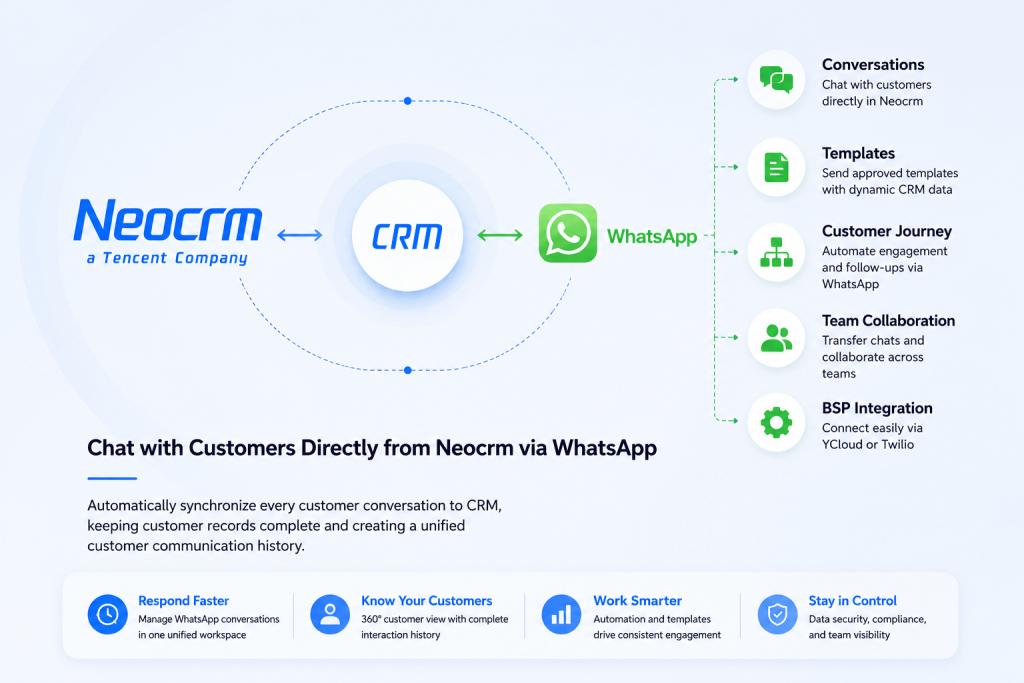
Every conversation is automatically connected to customer records, contacts, accounts, leads, and opportunities, creating a complete and traceable customer engagement history.
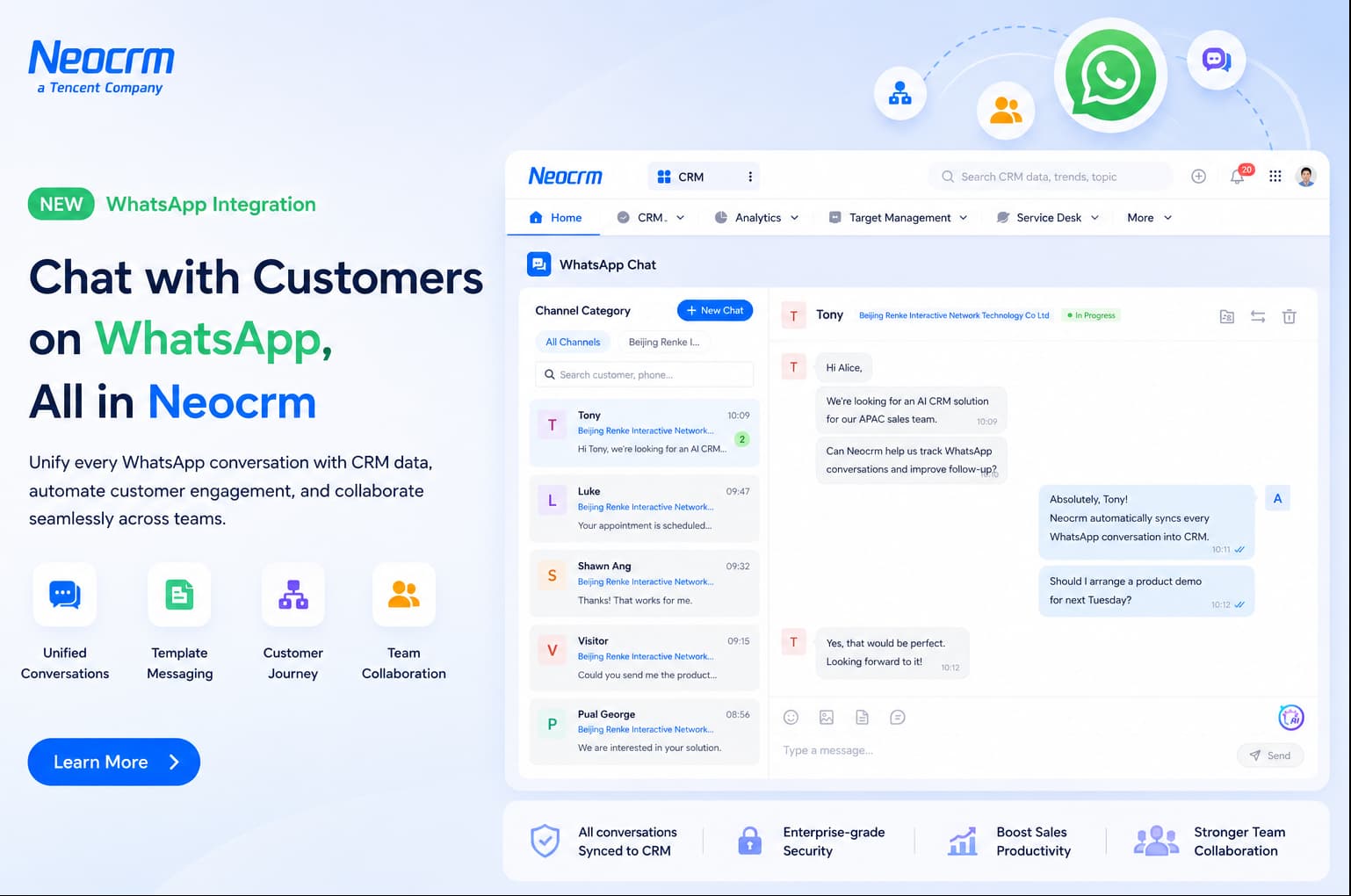
Beyond messaging, the integration also connects WhatsApp with the broader Neocrm ecosystem. Sales teams can send approved message templates, automate customer engagement through Customer Journey, collaborate seamlessly across teams with conversation transfer, and maintain complete visibility into every customer interaction.
3. Core Capabilities
Neocrm’s WhatsApp Integration is designed to support the entire customer engagement lifecycle—from daily conversations and marketing outreach to team collaboration and automated follow-ups. Rather than serving as a standalone messaging tool, WhatsApp becomes a fully integrated part of your CRM workflow, helping sales teams work more efficiently while maintaining complete customer visibility.
The following capabilities demonstrate how Neocrm transforms WhatsApp into a unified sales engagement platform.
3.1 Unified Customer Conversations
Manage all WhatsApp conversations directly inside Neocrm without switching between applications. Customer profiles, interaction history, and CRM records are displayed alongside every conversation, giving sales representatives complete context before replying.
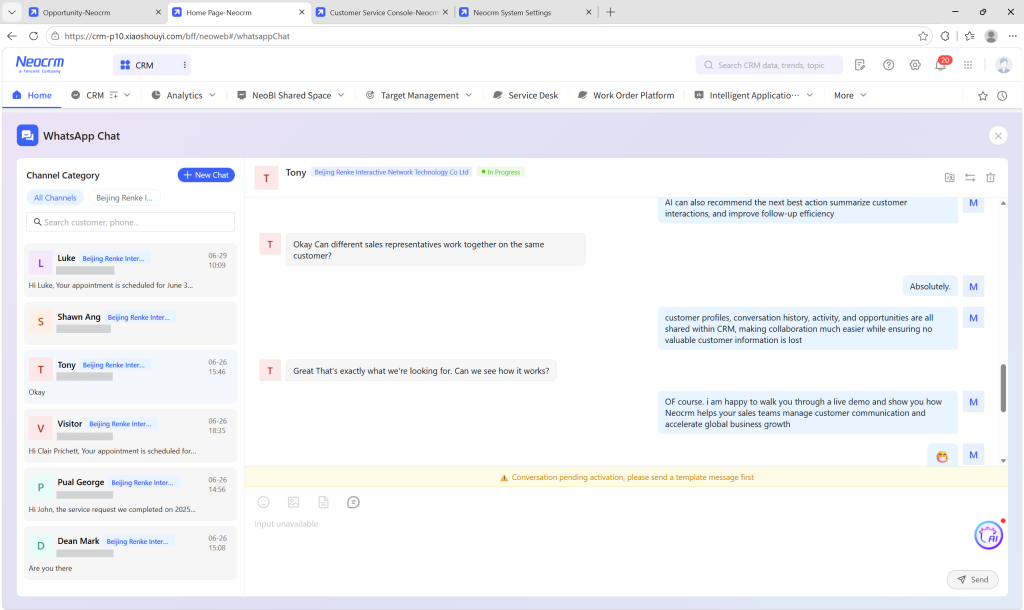
Every message is automatically synchronized with the CRM, ensuring customer communication remains centralized, searchable, and accessible across the entire team.
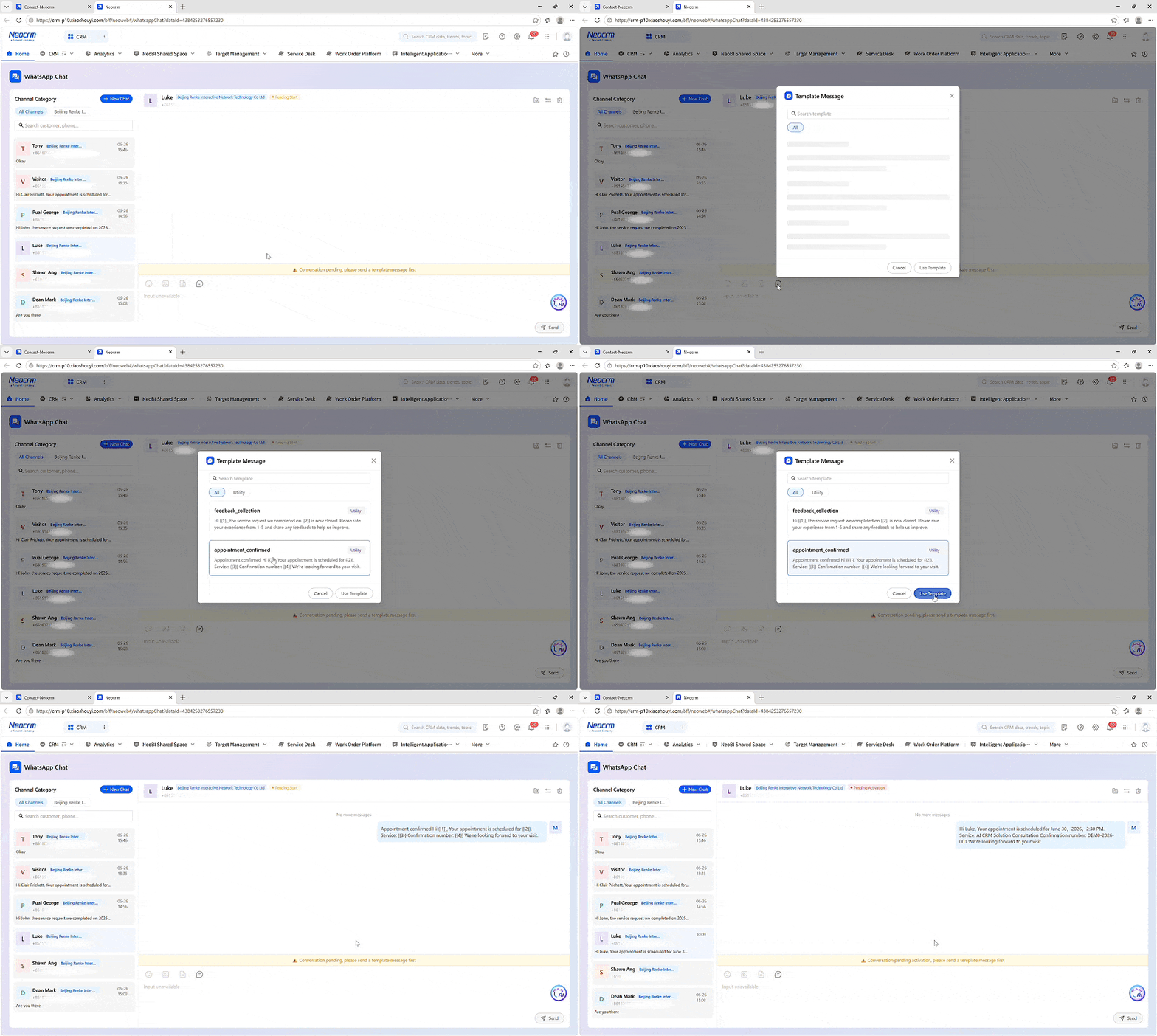
3.2 WhatsApp Template Messaging
Template messaging helps businesses initiate customer communication through Meta-approved message templates while ensuring consistency and compliance.
Neocrm supports seamless integration with the WhatsApp template library, allowing businesses to select approved templates, map CRM fields dynamically, and send personalized messages without manual editing.
3.3 Customer Journey Automation
Instead of sending messages manually, sales teams can automate customer engagement through a Customer Journey Map.
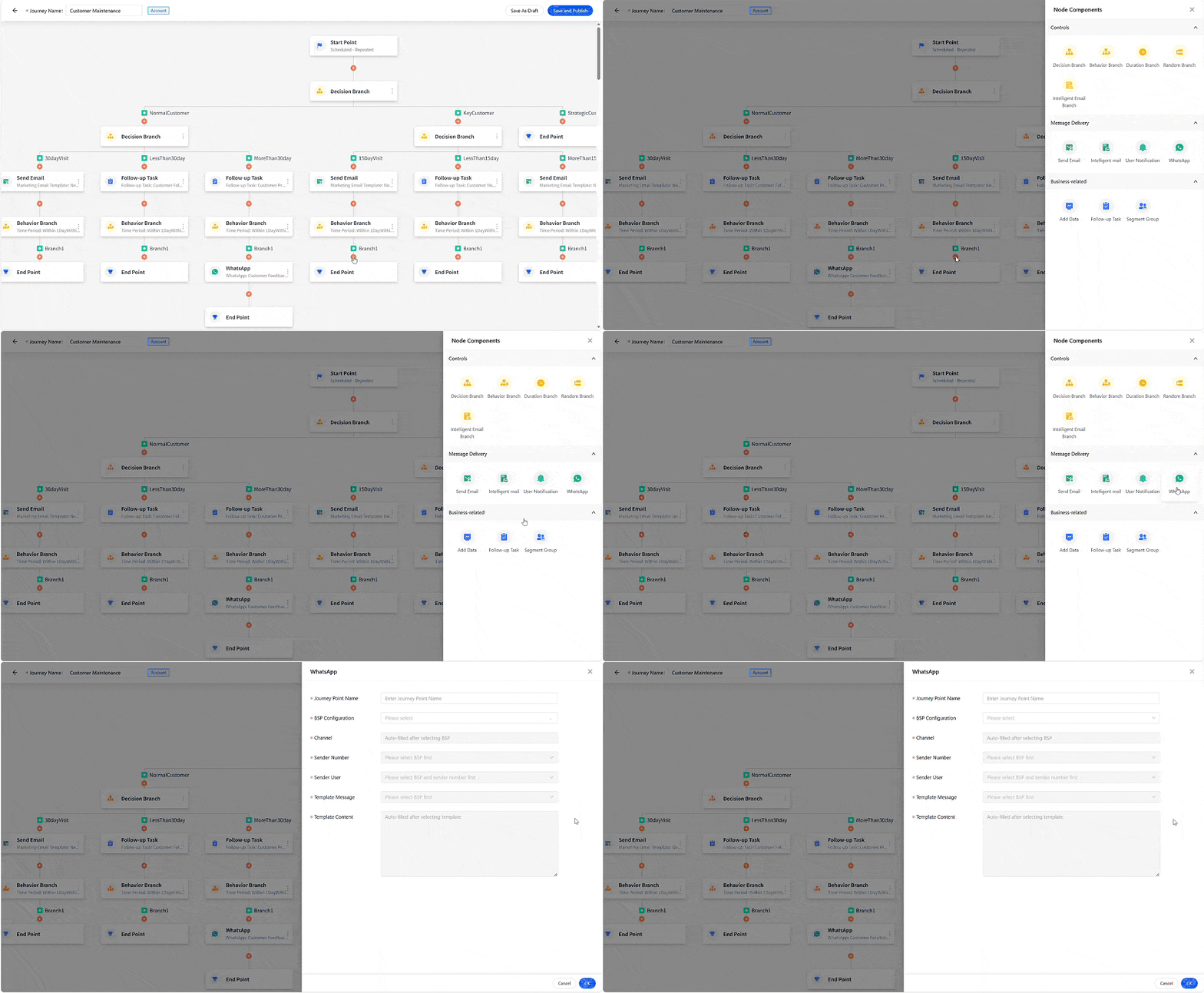
WhatsApp can be configured as a communication channel within journey workflows, allowing businesses to automatically deliver personalized messages based on predefined triggers such as lead creation, customer activities, or sales milestones.
3.4 Team Collaboration
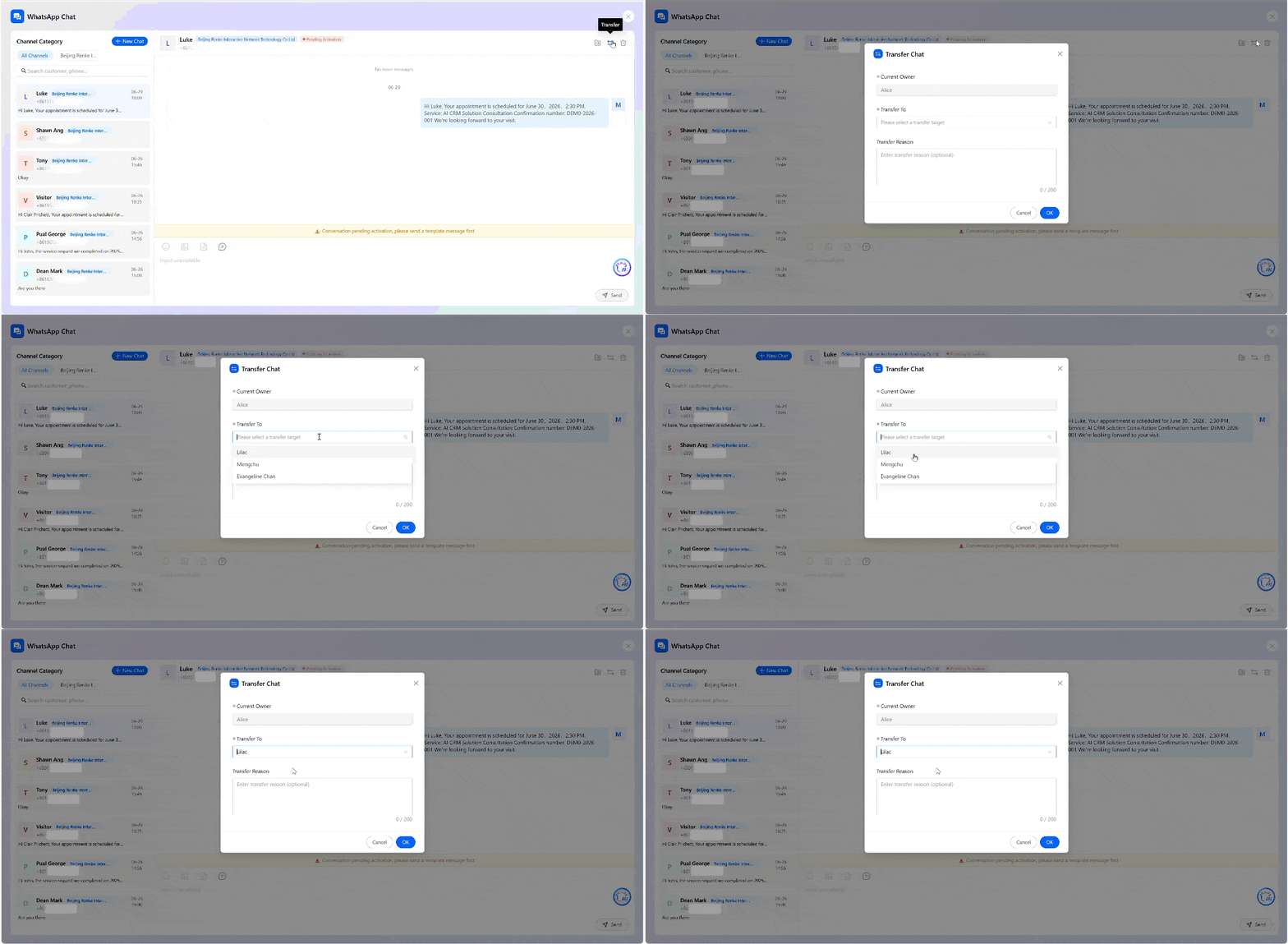
Customer conversations are no longer tied to individual devices or employees.
Neocrm allows conversations to be transferred between team members while preserving the complete interaction history, ensuring smooth collaboration and uninterrupted customer communication.
3.5 Flexible BSP Integration
Neocrm supports multiple WhatsApp Business Solution Providers, including YCloud and Twilio, giving businesses the flexibility to choose the provider that best fits their deployment requirements.
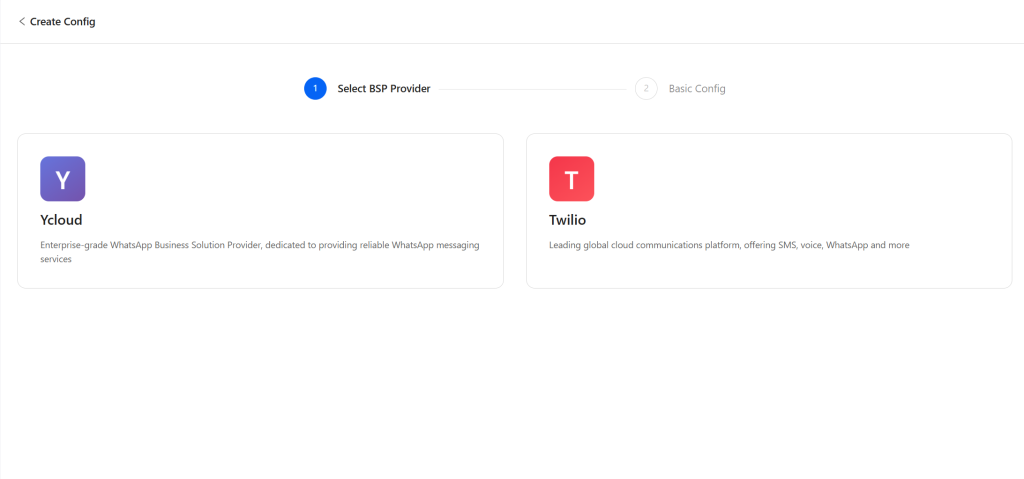
Configuration is straightforward. After connecting your BSP account and WhatsApp Business Account, key information such as WABA ID and API credentials can be synchronized with Neocrm to complete the integration.
4. Business Benefits
Neocrm’s WhatsApp Integration is more than a messaging solution—it connects customer conversations with CRM data, sales processes, and team collaboration. By bringing every interaction into one unified platform, businesses can improve operational efficiency, strengthen customer engagement, and build a more connected sales organization.
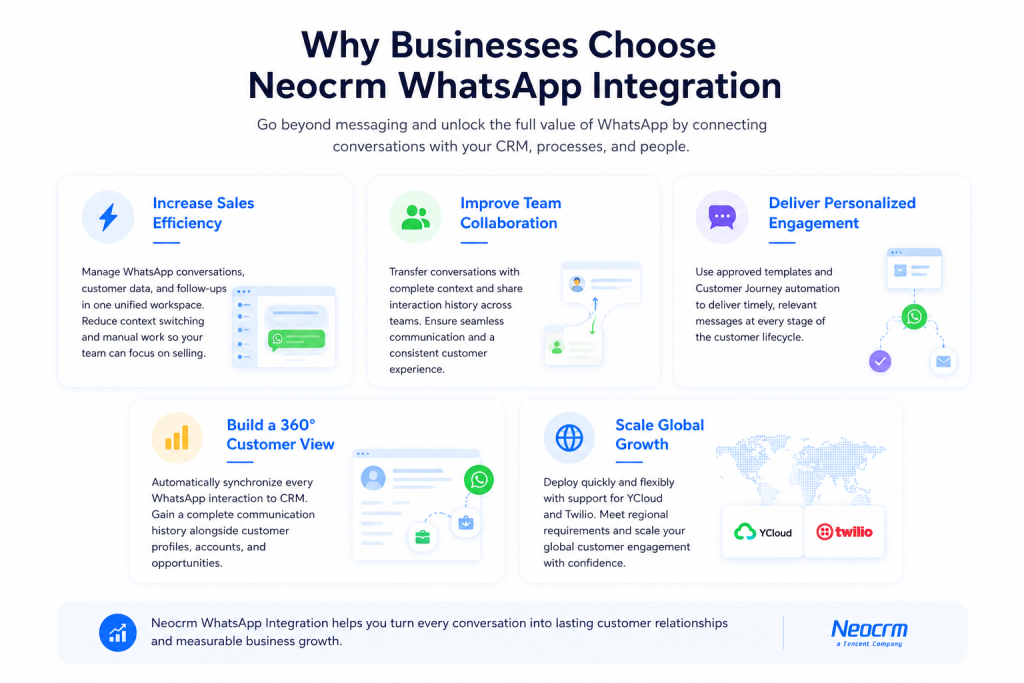
Ready to Get Started?
Customer conversations are one of your most valuable business assets. With Neocrm’s WhatsApp Integration, every message becomes part of a connected sales journey—from the first conversation to long-term customer relationships.
Whether you’re looking to improve sales productivity, automate customer engagement, or strengthen team collaboration, Neocrm provides everything you need in one unified CRM platform.
In addition, Neocrm supports WhatsApp integration for customer service scenarios. All messages are accessible right inside our Customer Service Console, where the AI Agent Assistant and Knowledge Base work together to recommend the best replies. The result? Smoother conversations, higher productivity, and no more guesswork in responding to customer inquiries.
Ready to bring WhatsApp into your CRM? Contact our team or schedule a personalized demo today.
FAQ
Yes. By integrating WhatsApp with a CRM like Neocrm, businesses can manage customer conversations, synchronize chat history, automate messaging, and maintain complete customer records within a single platform.
CRM integration helps centralize customer conversations, improve collaboration across teams, eliminate data silos, automate follow-ups, and provide AI with richer customer context for more intelligent recommendations.
Absolutely. The more high-quality customer conversations are accumulated inside your CRM, the more business context your enterprise AI can understand. Unlike public AI models that rely on generic knowledge, AI built on your own CRM data reflects your customers, products, sales methodology, and business processes—creating insights and recommendations that competitors cannot easily replicate.
Yes. Every WhatsApp interaction can be synchronized to Neocrm, giving sales and service teams complete visibility into customer communication history. This ensures customer information remains available even when team members change or conversations continue across different channels.
Yes. Neocrm supports conversation transfer and collaborative customer management. Team members can seamlessly hand over conversations, ensuring continuity even when account ownership changes or multiple departments participate in the customer journey.